
Small Buckets versus Big Buckets
|


Is the Office Dead?
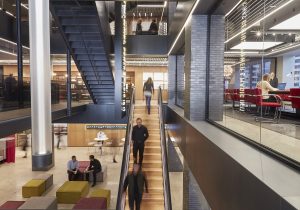
An ABC article ‘COVID-19 won't kill the office but people will need reasons not to work from home’ Rachel Pupazzoni states that at least half of office workers want the flexibility of working from home and offices of the future will have more collaborative space and fewer individual desks.
- EY surveyed 4,500 of its employees across Oceania – 48% want their homes to be a feature of the future office.
- Boston Consulting Group surveyed 12,000 of its employees and found 60 per cent want to choose where and when they work.
- Adecco's survey showed 75 per cent of workers want that flexibility.
I was talking to an IT Manager at a local council this week and he said that Covid had done 5 years of technology innovation overnight. We are definitely in the middle of a workplace revolution! The challenges are that we have more online communication to respond to and organise and still have a desire for face to face contact, the opportunities are that we can be more flexible to the needs of every employee, commute less and we can get more focused work done in remote locations.
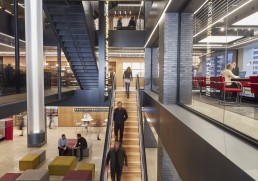
Is the office dead? No. But it will be re imagined and most likely a smaller space due to more remote work, with less individual desks and more collaborative spaces.
Deep Work
The majority of people that I have spoken to that have been working remotely recently have told me that they are being more productive at home than they were in an office! This is not hugely surprising as the ability to control distractions is much greater when we are not surrounded by our colleagues!
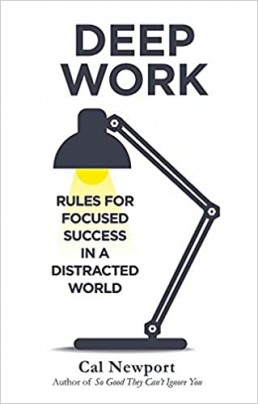
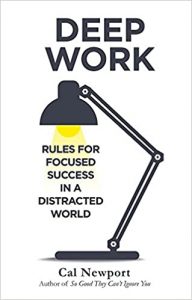
Cal Newport wrote a book called Deep Work. He describes deep work as “professional activity performed in a state of distraction-free concentration that pushes your cognitive capabilities to their limit”. In open plan office environments and with social media and email distractions in the background, very few of us work in this state on a daily basis which means the quality of our work is low and our productivity is not what it could be. That’s not to say that we don’t have time where we come together and collaborate on projects or complex work, it’s just to say that deep work needs to be incorporated in to our week and perhaps remote working can help with this.
If we are not used to working deeply, it can take some training to get our mind used to working this way.
The 3 things that have helped me train my brain to be more focused is:
- Turning my email notifications and social media accounts off for chunks of the day.
- Using an egg timer and setting time to work on tasks (with a reward at the end).
- Blocking off time in my calendar every day for deep work
BOOK RECOMMENDATION
I highly recommend Cal’s book for greater insights on this topic. The short Youtube video (click on link) will give you a taster.
Productivity in the New Normal
| I recently caught up with Craig Oliver about Productivity in this 'new normal'. We talked about what the current challenges and opportunities are in these times and how we can adapt.
Have a listen here while walking your dog or folding the laundry. Craig also has more podcasts available on his "Talking Better Business' series available on his website. |
We have a special offer for a 1 hour webinar
1 hour webinar $495 plus gst for up to 20 people (normally $990 plus gst)We have all experienced huge changes in our workplaces this year and in Victoria the lockdowns continue and many people are still working from home. Many of the people I have been speaking to over the past few months have told me that their preference is for a flexible working approach – a combination of working in a central office with the option of working remotely when needed. There’s no doubt we have walked through a new door!
The Productivity in the New Normal webinar will help your staff learn keys to adapting to this new way of work.
Email me at fnewton@productivityspecialists.com.au to discuss

Are you receiving more email?
The majority of us are either working from home or have some of our team working from home at the moment. Many of our clients are telling us that the volume of email that they are receiving has gone up significantly while we've been working remotely.
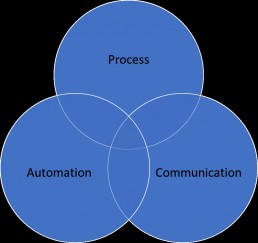
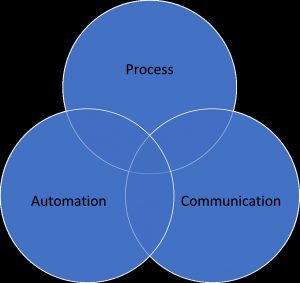
There are 3 key areas that we need to focus on to be the master rather than the slave of our Inbox - processing, communication and automation.
- Processing. It's easy to flag an email that needs actioning or leaving emails in the inbox when we are waiting for a reply. However, when we don't have a good process for managing email, emails can fall through the cracks and we often look at the email several times before we decide what to do with it. Every email is either deleted, filed or converted in to a task if it needs to be actioned.
- Communication - email protocols need to be established as team. Otherwise, Reply All will be overused, there will be poor subject lines and you may receive long emails with no real call to action.
- Automation - there's a significant portion of emails that come in to our Inbox which are what I call noise. Newsletters, notifications, Linkedin updates and cc'd mail. Setting up rules to automatically filter these emails in to a folder (or deleting) and checking them in your downtime can help reduce the large volume of email that you receive.
Productivity in the Virtual Workplace
Katrena Friel, creator of the Refresh Your Thinking and Becoming the Expert programs sat down with Fiona Newton, co-founder of Productive for a chat about our new reality, remote working and productivity in the virtual workplace. We are experiencing a revolution and have walked through a one way door but one thing we know for certain is that our work 'places' will never be the same again. Leaders will need to be able to adapt to managing teams that are in multiple places, meet virtually, communicate more online and collaborate in new and innovative ways.
Fiona and Katrena will give you some tips on what you will need to know to operate and thrive in our new reality.
Copy and past the link in your browser to watch the full chat.
https://www.youtube.com/watch?v=9FldY7O2eTo
Contact Katrena https://www.katrena.com.au/

Contact Fiona http://productivityspecialists.com.au/

More than a Game - Cameron Schwab

One of my great passions is AFL and women's sports and I do a weekly AFL show on Joy 949 called Chicks Talking Footy. My other passion is productivity and leadership. Recently, I had the pleasure of sitting down with Cameron Schwab former CEO of Richmond, Melbourne and Freemantle Football Clubs (who shares some of these passions). He now works developing leaders in his business DesignCEO and is a talented illustrator. We talked about how we fell in love with the game, pioneering women’s footy, the state of the league post Corona, mental health, vulnerability, productivity and how leadership in sport has evolved over the last few decades. Hope you enjoy our chat as much as we did.
https://joy.org.au/chickstalkingfooty/2020/06/10/more-than-a-game-cameron-schwab/
Fiona Newton
Trainer| Speaker| Broadcaster
Productive Events & Training
www,productivityspecialists.com.au
Work remotely or in a central office?
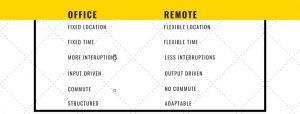
In a recent blog, 'Our New Reality: Predictions after Covid-19', KPMG made some predictions about how work will change going forward. They predict that remote working will increase, the 9-5 workday model will be challenged and leaders and managers will need to adapt to this change.
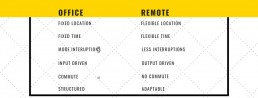
Fixed or Flexible location
Work is a thing you do, not a place you go. Leaders will now need to develop innovative ways to work with the personal circumstances of their team.
Fixed or flexible time
The 9 - 5 workday doesn't work for everyone. Many people I have spoken to are enjoying starting work earlier as they save time commuting in the morning. Others are enjoying flexibility around child care drop offs. Remote working can make this easier.
More or Less interruptions
It's easier to manage interruptions away from a centralised office and get more focused productive work done – no colleagues dropping in at your desk!
Input v Output
Work will now need to be measured by outcomes and work produced rather than input. This will take trust and maturity from everyone.
Manager-driven v self-driven
It takes a higher level of self-motivation to work from home or remotely. Your team will need to be better at managing time than ever before.
Commute v no commute
The average commute time in Australia is 3 hours and 37 minute a week (half a work day). The commute from the bedroom to the home office is 2 minutes on average (informal research). That's time that can be spent with family, hobbies or exercise.
Structure v adaptable
Our workforce is going through a revolution. We will need to adapt quickly but with new technologies, improving home set ups and innovative leadership we can do it.
Speaking of being adaptable…
We've had to reimagine the way we deliver training and meet the needs of our clients as the game has changed for us. So, we now deliver all our training online via web training and we usually have a maximum of 14 people in a full day training session and 12 people in a half day face to face. For the remainder of 2020, we will offer 2 full day or 2 half day sessions with maximum 7 for full day and 6 for half day, for the price of a one day session! This means you can still train the same amount of people for the same price but it's staggered over 2 session to allow for smaller class sizes. Contact us at info@productivityspecialists.com.au to discuss.
Fiona Newton
Training Director
Productive Events & Training
Get more work done at home than in an office!
There's a lot of advantages from working from home! The commute from the bathroom to the office takes 30 seconds to 1 minute depending on the size of your home, pants are optional, less interruptions from colleagues dropping in to discuss the weekend or drop unexpected work on your desk and you can start your day earlier if you want to because there will be less time taken to get ready to be at your desk. Plus it's a more sustainable way of living when we're not all travelling by car or public transport.
I'm not saying there aren't interruptions at home because it can be challenging (especially if you are home schooling right now or live in a small apartment) but I find they can be managed easier than in an office with many people. I recently delivered a 'Productive Work From Home' webinar to an accounting firm and these were some of the tips that I gave them.
- Structure your day like you would in the office. It will help avoid procrastination traps.
- You can steer a ship that's not moving. It can be harder to get momentum at home so do one or two easy things on your list to start moving.
- Choose a dedicated place for work in your house. If it can't be a whole room, try and section off an area to keep personal space and work space separate. Having a place that is consistently your 'work space' helps get you in the right frame of mind.
- Make it hard to get sucked in to the vortex of social media. Log out of Facebook, Twitter, Instagram or whatever platform that can suck you in to. They're a productivity pirate. Check in break times. Likewise, when you aren't making calls, put your phone away from you.
- Working from home can be lonely. I've found myself talking too long to the person making my coffee. Have regular team 'huddles' where you connect and plan together and batch your meeting time and book lunches with people to catch up
- Save calls and meetings to late morning or the afternoon if possible. Guard your morning time for the most important and critical work.
- Communicate expectations with anyone that will be home with you. Be clear about when you are in 'office' time.
- Have scheduled breaks away from your desk and get out of the house or (or go to your backyard) for exercise during the day. You'll be more productive and healthier.
Fiona Newton
Training Director
Productive Events & Training
10 Tips for Online Meetings
Social distancing is a phrase that we've all had to get used to very quickly! I prefer the term physical distancing because we can still be social (and connected) while being physically distant thanks to technology. Many of us are now working from home full time and therefore meeting via Zoom, Skype, Go To Meetings or similar technology. In our industry, we've been meeting, coaching and training online for a few years now and this is what we've learned.
There's a lot of advantages to meeting online. It's more cost-effective - it saves money because of time saved in travel and commuting. The meetings tend to be shorter because we have to be more succinct in the way we communicate. We can meet more often if required because it's more accessible and location is not an issue as we can meet from anywhere.
However, online meetings have challenges that we need to be aware of so that we can overcome them. You can't simply convert a face to face meeting style or training session in to an online Zoom or Skype session and expect the same results. You are limited with how you can interact with a virtual audience.
So, here's 10 of our tips for online meetings...
|
Fiona Newton
Trainer| Speaker| Broadcaster